
The best micro market refrigeration setup for most locations is an IoT-enabled upright merchandiser or smart cooler paired with well-planned shelving. It holds food at safe temperatures, alerts you before spoilage happens, and shows off products the way a vending machine never could. Whether you buy the unit, lease it, or hand the whole thing to a managed program, that core combination is what makes a micro market actually work.
TL;DR:
- Properly sized micro market coolers should match SKU counts and restock cycles, with a typical capacity of enough cubic feet to hold two to three days of inventory.
- Energy-efficient units with ENERGY STAR certification, LED lighting, EC fans, and low-GWP refrigerants can significantly reduce operating costs, with daily costs calculable from wattage, duty cycle, and local electricity rates.
- Remote monitoring systems automatically track temperature, door activity, and compressor cycles to prevent spoilage, reduce manual checks, and enable proactive maintenance.
- Delivery delays often stem from electrical, power, or space issues; confirming these parameters before equipment arrival minimizes installation problems and downtime.
- Managed micro-market programs with no upfront equipment costs include ongoing maintenance, monitoring, and restocking support, making them ideal for small teams or facilities with limited support infrastructure.
Table of Contents
- What Types of Micro Market Refrigeration Equipment Should You Consider?
- How Do You Size and Spec a Micro Market Cooler?
- What Determines Energy Efficiency and Operating Cost?
- Why Does Remote Monitoring Matter for Micro Market Refrigeration?
- What Should You Check Before Installation Day?
- How Do You Keep a Micro Market Cooler Food-Safe?
- How Do You Evaluate a Refrigeration Vendor’s Reputation?
- What Does the Procurement Timeline Actually Look Like?
- Buy, Lease, or Managed Program: An Operator’s View
- Get a Turnkey Micro Market With Refrigeration Fully Handled
- Sources
- FAQ
What Types of Micro Market Refrigeration Equipment Should You Consider?
Most micro markets run on some combination of four equipment types, and picking the wrong one for your traffic pattern is the single most common setup mistake facility managers make.
Glass-door merchandisers are the workhorses. They look like a convenience-store cooler, hold the widest SKU variety, and let customers see exactly what’s inside before they scan anything. Industry coverage of micro market cooling notes that display refrigeration drives higher ticket sizes precisely because shoppers can spot meal-sized items and packaged salads that a traditional vending machine can’t stock.
Smart grab-and-go cabinets use cameras or weight sensors to identify what a customer removes, then charge automatically without a cashier or even a barcode scan. These cost more upfront, but AI-powered smart cabinets are showing up more often in vendor catalogs as operators chase lower shrinkage in honor-system environments.
Under-counter and compact units fit tight footprints, like a break room corner or a small lobby nook, where a full-size merchandiser won’t clear the doorway.
Freezer units round out the mix for operators stocking frozen meals or novelty items, though they draw more power and need separate planning.
Here’s how that maps to real locations:
- Office pantries usually do best with one mid-size glass-door merchandiser plus ambient shelving. Traffic is steady but not huge.
- Gyms benefit from smart cabinets because members grab protein shakes and bars fast, often mid-workout, with little patience for a slow checkout.
- Hospital and warehouse lobbies with round-the-clock traffic often justify two units: one refrigerated, one frozen, to cover shift workers at odd hours.
The trade-off is consistent across all of them: more visibility and merchandising power almost always means more energy draw and, without cameras or a locked kiosk, more theft risk.
How Do You Size and Spec a Micro Market Cooler?
Sizing a cooler wrong is expensive twice: once when you overbuy capacity you never fill, and again when you underbuy and run out of cold space during a Monday rush. Start with your SKU count and expected daily unit sales, then work backward to cubic feet.
- Estimate your SKU mix. A typical micro market carries a moderate number of refrigerated SKUs. Multiply your expected facings per SKU by average product depth to get a rough cubic-foot target.
- Add a buffer for restock cycles. If your restocking partner visits twice a week, you need enough capacity to hold two to three days of inventory without empty shelves.
- Check usable cubic feet, not just exterior dimensions. Vendor listings sometimes advertise total volume while shelving and compressor housing eat into what you can actually stock.
- Confirm the temperature range. Commercial smart coolers commonly run in the 34 to 46 degree Fahrenheit range, which covers most grab-and-go foods without freezing drinks.
- Review door type and shelf adjustability. Sliding glass doors save floor space in narrow hallways; hinged doors open faster during peak restocking.
- Ask about defrost method. Automatic defrost cycles reduce maintenance visits but briefly raise interior temperature, something to factor into your food-safety monitoring.
On the planogram itself, keep drinks on lower, deeper shelves since they’re heavy and don’t bruise. Put meal containers and salads at eye level, where they sell best. Reserve the top shelf for lighter grab-and-go snacks. Before rolling a planogram out across multiple sites, pilot it on one unit for two to four weeks and watch what actually moves. That single step prevents the SKU churn that wastes half a year of guesswork.
Bring this checklist to every vendor quote: usable cubic feet, shelf count and adjustability, door type, temperature range, defrost method, and warranty length.
What Determines Energy Efficiency and Operating Cost?
Refrigeration is usually the single biggest electricity draw in a micro market, and the gap between an efficient unit and a mediocre one can run hundreds of dollars a year per cooler. Four components decide most of that gap: compressor type, insulation thickness, door design, and defrost cycle frequency.
Compressors with variable-speed or EC (electronically commutated) motors ramp power up and down with demand instead of running full blast constantly, which cuts consumption noticeably compared to older single-speed units. Better insulation and tighter door gaskets mean the compressor doesn’t have to fight warm air leaking in every time someone opens the door.
When comparing units, look for these signals:
- ENERGY STAR certification, where the manufacturer offers it, since it’s the clearest third-party efficiency signpost in commercial refrigeration.
- LED interior lighting instead of fluorescent, which draws less power and produces less heat the compressor then has to offset.
- EC fan motors in the condenser, a detail vendors often bury in spec sheets but worth asking about directly.
- Low-GWP refrigerants, which matter both for your operating footprint and for future regulatory compliance as older refrigerants phase out.
Pro Tip: Ask any vendor for the unit’s rated wattage and typical duty cycle (the percentage of time the compressor actually runs versus idles). Multiply wattage by duty cycle by 24 hours, then by your local electricity rate, and you get a workable estimate of daily operating cost before you sign anything.
Refrigerant choice also affects end-of-life disposal. Units using older high-GWP refrigerants often carry stricter recovery and recycling requirements when they’re eventually replaced, something worth confirming with your installer up front rather than discovering years later.
Why Does Remote Monitoring Matter for Micro Market Refrigeration?
A cooler that fails silently overnight can spoil an entire week’s inventory before anyone notices. That’s the exact failure mode remote monitoring exists to prevent, and it’s the biggest operational difference between older refrigeration units and modern IoT-connected ones.
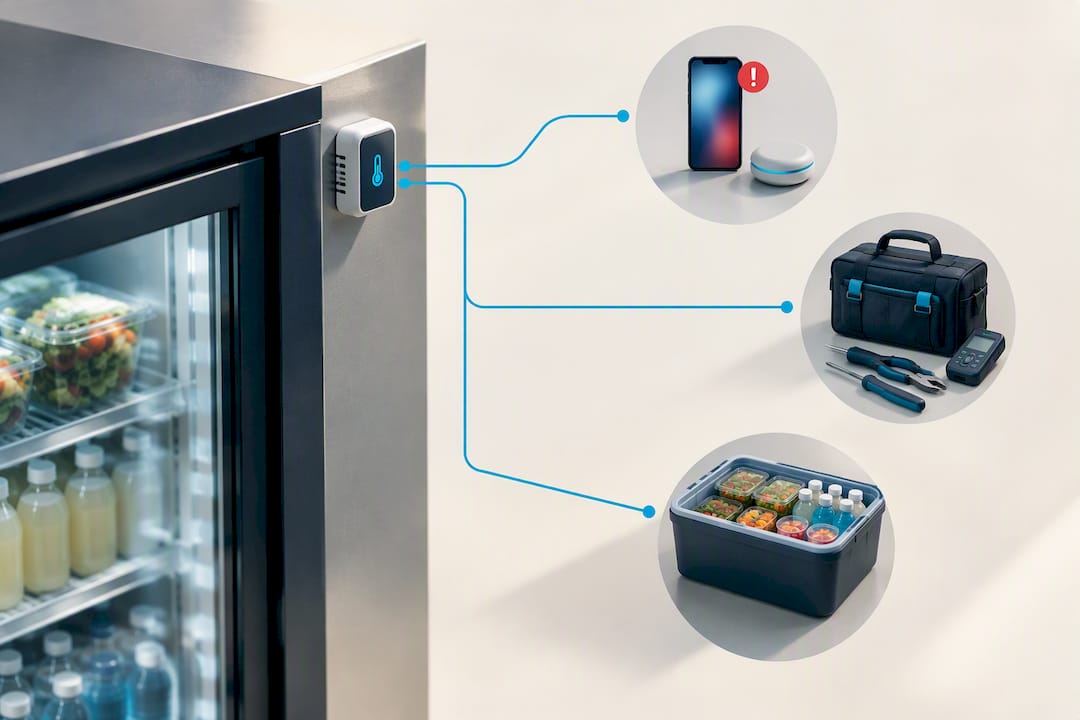
The telemetry that actually matters includes temperature logs recorded at regular intervals, door-open event tracking, compressor cycle data, and power-loss history. IoT-enabled refrigeration cabinets use this data to flag problems automatically, cutting down on the manual temperature checks staff used to do by hand, and reducing both labor hours and food waste in the process.
That shows up operationally in a few concrete ways:
- Proactive maintenance: a compressor cycling more frequently than normal usually signals a failing part weeks before it actually breaks down.
- Remote alarm management: a manager can silence a nuisance alert from a phone instead of driving to the site.
- Automated documentation: temperature logs generated automatically satisfy inspection recordkeeping without a clipboard, and platforms that retain around 90 days of history give you a real paper trail for audits.
On the integration side, many kiosk systems will lock a cooler out of the point-of-sale automatically if temperature drifts outside a safe range, similar to how a HealthLock-style safeguard works, preventing sales of product that may already be compromised.
Pro Tip: Before signing with any vendor or managed provider, ask them to walk through the exact alert workflow: what triggers a notification, who receives it, how fast someone actually responds, and what happens if nobody does. Vague promises about “24/7 monitoring” mean very little without specific escalation timelines attached to them.
What Should You Check Before Installation Day?
Delivery day delays almost always trace back to something a facility team could have confirmed weeks earlier, making proper planning for commercial office cabinetry crucial to a smooth installation. Work through this list before your equipment arrives:
- Power. Most commercial coolers need a dedicated 120V or 208/240V circuit, depending on unit size. Confirm breaker sizing against both running amps and the higher inrush current the compressor draws on startup, since an undersized breaker will trip repeatedly.
- Clearance and ventilation. Condenser coils need airflow on the back or top of the unit, typically several inches of clearance minimum. A cooler pushed flush against a wall runs hotter and less efficiently, and can trip thermal overload protection.
- Connectivity. Wired ethernet gives the most reliable telemetry connection, but Wi-Fi works fine if signal strength at the install site is tested in advance rather than assumed. Cellular telemetry is a solid backup where neither is reliable.
- Delivery logistics. Measure doorway widths, hallway turns, and floor loading capacity, especially for upper-floor installs. A unit that won’t fit through a doorway is the single most avoidable installation failure.
A setup checklist built specifically for facilities teams can catch most of these before delivery trucks are even scheduled. White-glove install options, where the vendor handles placement and initial power-up, are worth the added cost for locations without an in-house maintenance team.
How Do You Keep a Micro Market Cooler Food-Safe?
Unattended retail puts more pressure on maintenance discipline, not less, since there’s no cashier around to notice a warm cooler or a leaking gasket.
Daily and weekly tasks should include reviewing automated temperature logs, inspecting door gaskets for gaps or wear, and clearing condensate drains before they clog and cause water pooling. Monthly or quarterly service should cover condenser coil cleaning (dust buildup is one of the most common causes of reduced efficiency), refrigerant level checks, and compressor service per the manufacturer’s schedule.
On the food-safety side, refrigerated ready-to-eat items need to stay within safe cold-holding ranges consistently, not just at the moment someone checks. The CDC’s guidance on temperature control for preventing foodborne illness is the standard reference point most health departments and NAMA guidance point back to.
- Keep temperature logs accessible for at least the recordkeeping window your local health department expects.
- Inspect gaskets and seals monthly; a warped gasket is often the earliest sign of a door that’s not sealing properly.
- Clean condensate drains on a fixed schedule rather than waiting for a visible leak.
- Service compressors on the interval the manufacturer specifies, not just when something breaks.
Inspectors generally want to see a consistent temperature record more than anything else. Telemetry that logs automatically turns that from a manual chore into something you can hand over in seconds.
How Do You Evaluate a Refrigeration Vendor’s Reputation?
A cooler is only as reliable as the company standing behind it once something goes wrong. Before committing to a vendor or managed provider, look past the spec sheet and check how they actually perform when equipment fails.
Start with warranty terms: how many years of coverage, and does it cover parts, labor, or both. Then ask about service response times in writing, not verbally, since “we respond quickly” means nothing without a number attached. A same-day or next-day response commitment for a refrigeration failure is a reasonable standard to hold vendors to, given how fast perishable inventory can spoil.
Industry trade publications like VendingTimes and Vending Market Watch regularly cover which manufacturers and operators are launching new equipment, expanding service territories, or facing recalls, and they’re worth a quick search before signing a multiyear agreement. Ask any prospective vendor for references from current clients in a similar setting, whether that’s a gym, office, or hospital, since service quality often varies more by account size than by brand name.
Also check how support requests are actually handled: is there a live phone line, a ticketing system, or only email? Response infrastructure tells you more about real-world reliability than a glossy brochure ever will. A vendor with strong telemetry but weak follow-through on alerts is arguably worse than one with simpler equipment and a fast human response.
What Does the Procurement Timeline Actually Look Like?
Most facility managers underestimate how long the process runs from first quote to fully operational, mostly because equipment lead times vary more than people expect.
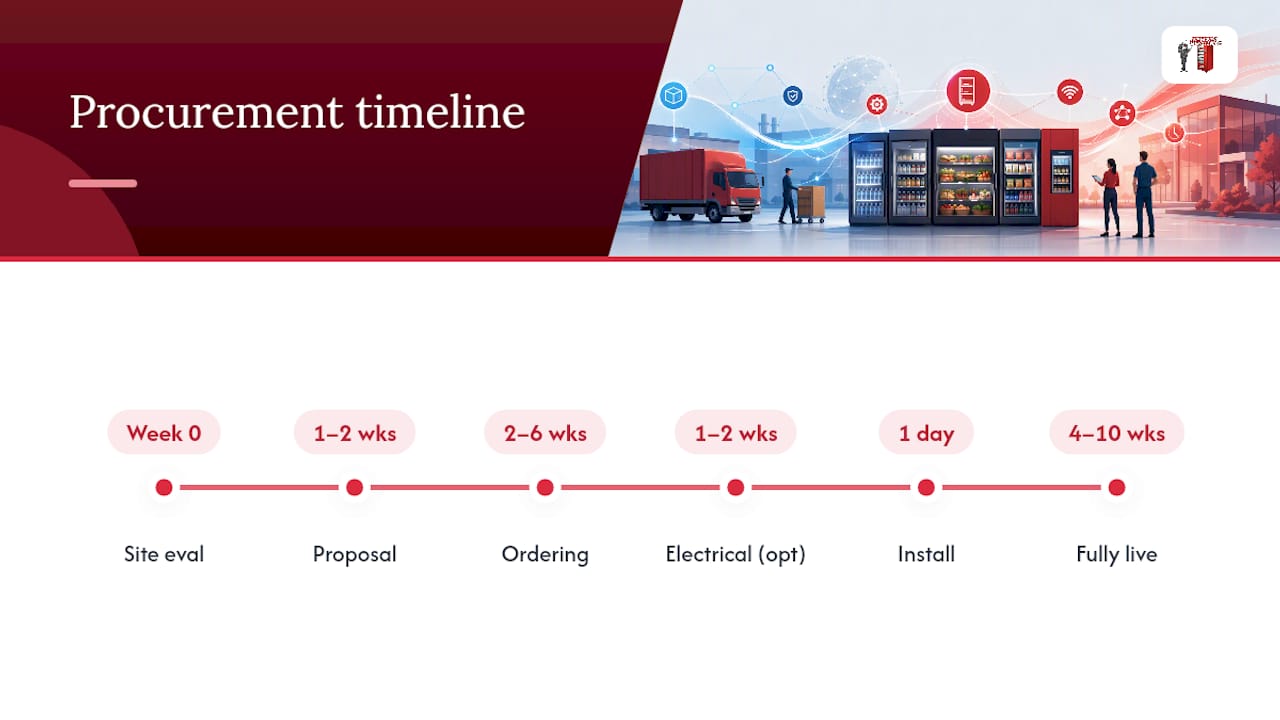
After an initial site evaluation, typically a walk-through to assess power, space, and traffic patterns, expect one to two weeks for a proposal and equipment recommendation. Ordering standard glass-door merchandisers usually takes two to six weeks depending on manufacturer backlog, while smart cabinets with AI vision or weight sensors can run longer given more limited production volume.
Installation itself, once equipment arrives, is often completed in a single day for a straightforward setup with existing power and network infrastructure. Sites needing new electrical circuits or network drops should budget an extra one to two weeks for that electrical work before delivery.
After physical installation, expect a short calibration period, generally a few days, where the system’s temperature sensors and any AI vision or weight-sensor calibration get dialed in and telemetry connections are confirmed. Managed programs typically bundle initial stocking into this window so the market opens fully loaded rather than half-empty.
Altogether, a realistic timeline from signed agreement to a fully stocked, monitored micro market runs roughly four to ten weeks, with the wide range driven almost entirely by equipment lead time and whether electrical work is needed. Managed programs tend to compress this because the provider is sourcing equipment continuously rather than one-off.
Buy, Lease, or Managed Program: An Operator’s View
Buying equipment outright makes sense if you have facilities staff who can handle maintenance calls and you plan to run the market for many years. Leasing splits the difference, lower upfront cost, but you’re still coordinating service yourself.
Managed programs fit best when your team is small, IT support is limited, or you’d rather have someone else own the uptime problem entirely. When vetting a managed partner, ask about restock cadence, telemetry dashboard access, merchandising support, and, critically, written service response times. Managed micro-market programs that bundle equipment, install, and monitoring at no cost to the host site remove nearly all of that operational burden from your plate.
— Gary
Get a Turnkey Micro Market With Refrigeration Fully Handled
Some managed micro-market programs run at no upfront cost to your business, meaning no capital outlay for coolers, no maintenance contracts to negotiate, and reliable vendor support when equipment issues arise.
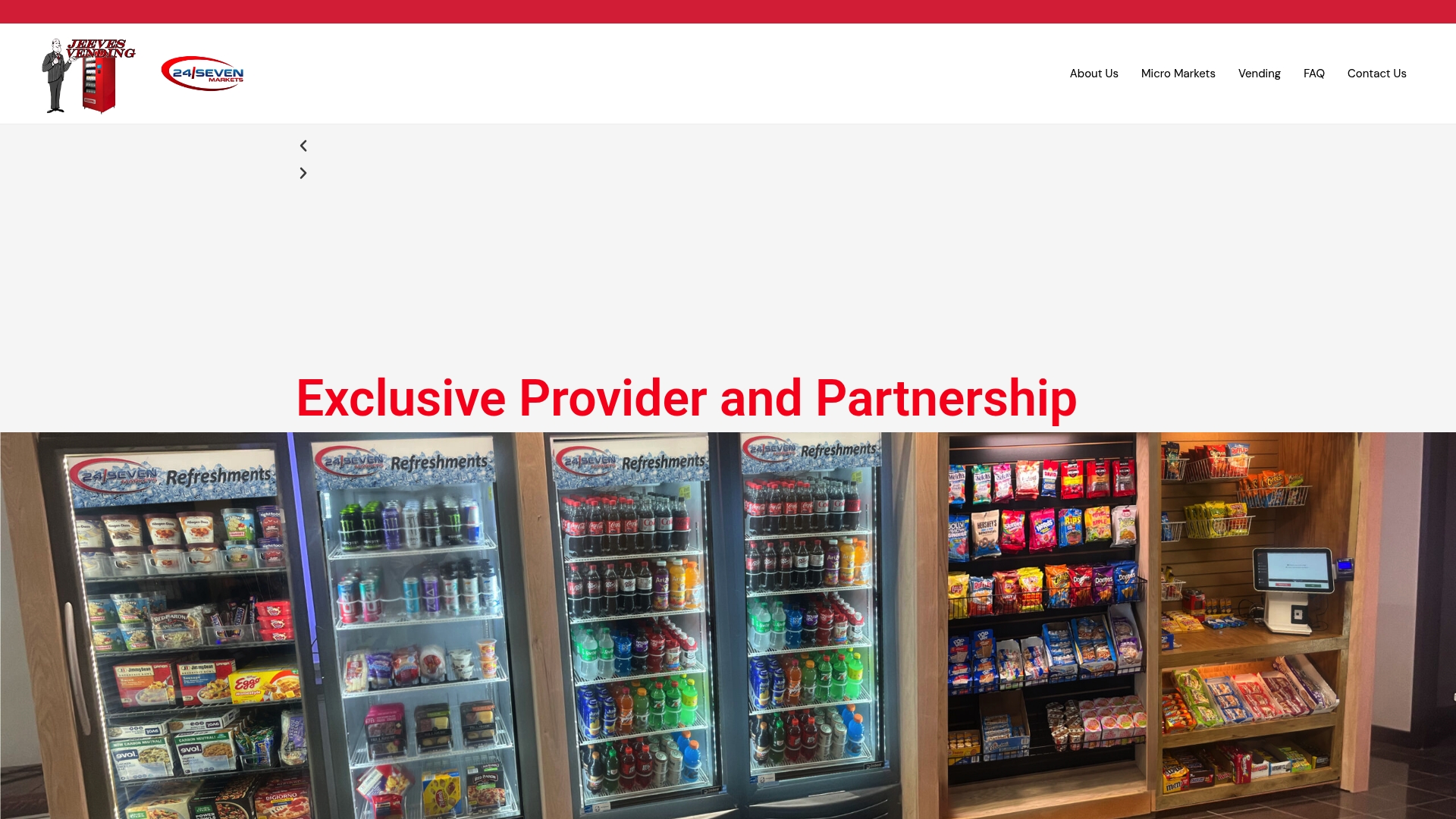
Programs often include smart cooler options with remote temperature monitoring, managed restocking on a set cadence, and merchandising support so shelves carry what actually sells at the location, whether that’s an office, gym, hospital, or warehouse floor. A site evaluation typically starts with a short walk-through to check power, space, and expected traffic, then the provider handles equipment selection, delivery, and installation from there.
If your facility is weighing refrigeration equipment purchases against a fully managed alternative, start with the free vending and micro-market program for business owners and request a site evaluation to see what a turnkey setup would look like at your address.
Sources
- How IoT refrigeration cabinets improve micro markets — VendingTimes
- What are micro markets? — WebstaurantStore
- Micro Market Food Coolers — Vending Market Watch
- Centers for Disease Control and Prevention (CDC)
FAQ
How Much Does a Smart Micro Market Fridge Cost?
Pricing varies widely by size, AI/vision features, and whether you buy or lease, and specific figures depend on the vendor and configuration. Jeeves Vending’s current program pricing is listed on its site, and its managed micro-market program carries no upfront equipment cost to the host business.
How Much Do Micro Markets Cost Overall?
Total cost depends on square footage, number of refrigerated units, kiosk technology, and whether you choose a managed program versus buying outright. A managed setup like Jeeves Vending’s micro-market program shifts that cost away from the host business entirely, since equipment, install, and service are provided at no charge.
Can You Give an Example of a Micro Market Setup?
A typical micro market includes one or two refrigerated merchandisers for drinks and fresh food, an ambient shelving section for snacks, a self-checkout kiosk, and remote monitoring on the cooling equipment. Common locations include office break rooms, gym lobbies, hospital waiting areas, and warehouse floors where reliable power and internet are available.
How Do You Keep Food Cold Without Constant Power Access?
Traditional cold-storage methods like ice blocks or insulated coolers work for short-term or off-grid situations, but they’re not a practical substitute for a micro market, which needs continuous, monitored refrigeration to meet food-safety standards. For a commercial micro market, a dedicated electrical circuit and a properly rated cooler are non-negotiable requirements, not optional extras.
What Telemetry Should a Micro Market Cooler Report?
At minimum, expect temperature history, door-open events, compressor cycle data, and power-loss alerts sent by SMS or email. These data points let IoT-enabled refrigeration systems catch problems before spoilage occurs rather than after a customer complains.